How-to
Configure a custom Income Tax (TDS) percentage
As per the Income Tax Act, the TDS (Tax Deducted at Source) on salary should be deducted at the rates prescribed by the Income Tax department.
However, at times, companies may want to deduct TDS at a certain rate for internal business reasons.
Follow these steps to configure and deduct tax at a specific rate.
- Navigate to Control Panel → Payroll → Salary Templates.
- Edit the salary template for which you want to change the rate.
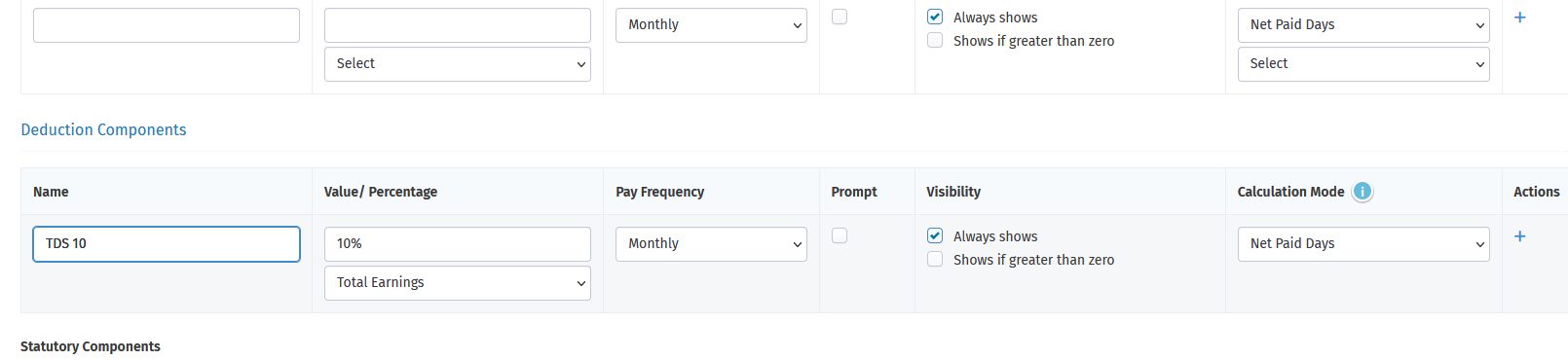
- In Deductions Components, create a new component, TDS 10, as shown in the screenshot below. The value should be 10% of Total Earnings.
- Save the template and assign it to the employee.
Disclaimer: Income Tax on salaries should be as per the percentages defined by the Income Tax Department. Since you are overriding these, we strongly recommend that you take a legal and professional opinion.
We do not recommend overriding the Tax component. We strongly advise using the Income Tax component for Indian payroll.