How-to
Treat unapproved timesheets as LOP despite logged attendance
On this page
Managing employee attendance accurately is critical for ensuring proper payroll processing and maintaining organizational discipline. HRStop provides a configurable feature to handle cases where employees log their attendance but fail to get their timesheets approved. This setting ensures that unapproved timesheets are automatically considered as Loss of Pay (LOP), even if the attendance has been recorded.
How it works
When this setting is enabled:
- Employees may log their attendance as usual.
- If their timesheet is not approved by the designated manager or admin, the system automatically considers the unapproved days as LOP.
- This ensures that payroll reflects only approved work hours, safeguarding the organization from errors or misuse.
Steps to enable the setting
- Access the Control Panel
Log in to HRStop with your admin credentials and navigate to the Control Panel. - Go to Settings
Within the Control Panel, select Settings to configure attendance-related rules. - Navigate to Attendance Rules
Click Attendance and then select Rules to view all configurable attendance options. - Enable the unapproved timesheet LOP setting
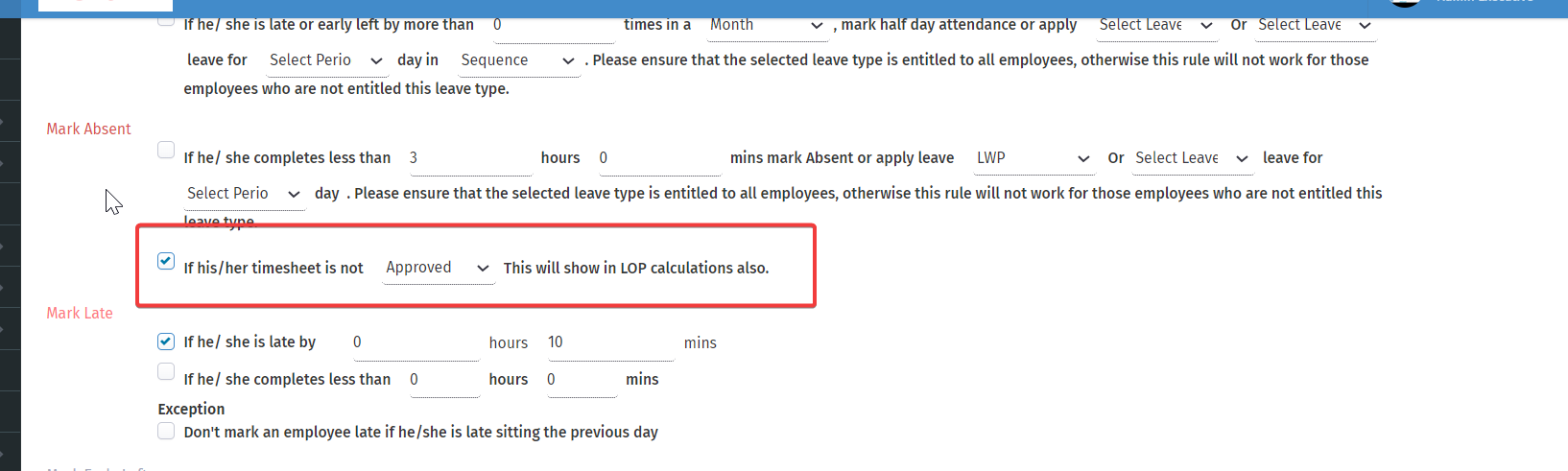
Under the Mark Absent section, enable the option: “If his/her timesheet is not approved, this will show in LOP (Loss of Pay) calculations.” - Save changes
Save your changes to apply the rule across your organization.
Visual guide
The screenshot below shows where to find this setting and how to enable it.