How-to
Update a perquisite
To update a perquisite:
Follow these steps to update a perquisite:
1. Navigate to: Control Panel → Payroll → India → Perquisite
Link: ( https://companyname.in.hrstop.com/ControlPanel/Payroll/India/Perquisites)
2. A new page opens, as shown below:
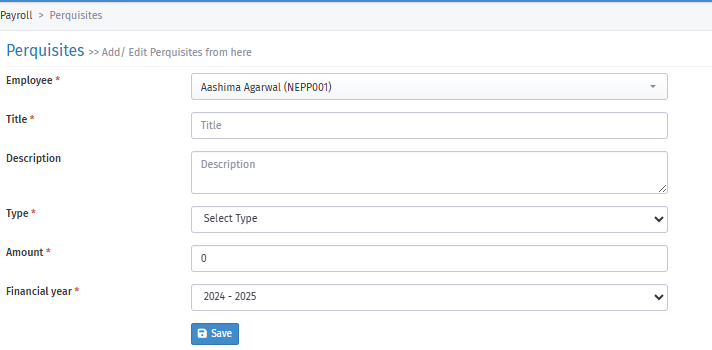
3. Fill in the options below:
Employee: Select the employee.
Title: Enter the perquisite name.
Description: Enter any note for the perquisite.
Type: Select the perquisite name as entered in Title.
Amount: Enter the amount paid for the perquisite.
Financial Year: Select the financial year.
Finally, click the "Save" icon to update the perquisite.
4. You can also update perquisites using the Import option:
i. Click the Import arrow at the top right.
ii. Download the sample CSV file.
iii. Fill in the above columns in the CSV file.
iv. Upload the CSV file.