How-to
Two-factor authentication
HRStop offers Two-Factor Authentication (2FA), a security upgrade wherein you provide an OTP triggered on your registered device (authenticator app) to verify your identity.
2FA offers an extra layer of security to your HRMS portal when you delete an employee profile from the system, as this data cannot be recovered once deleted. Even if a hacker manages to steal your password, they still need the second factor to perform this action.
Follow these steps to enable 2FA in your account. Once done, you can perform various operations in the system.
- Click the "Main Panel" / Dashboard link.

- Click your name at the top right of the page.

- Click the "Two Factor Authentication" link.

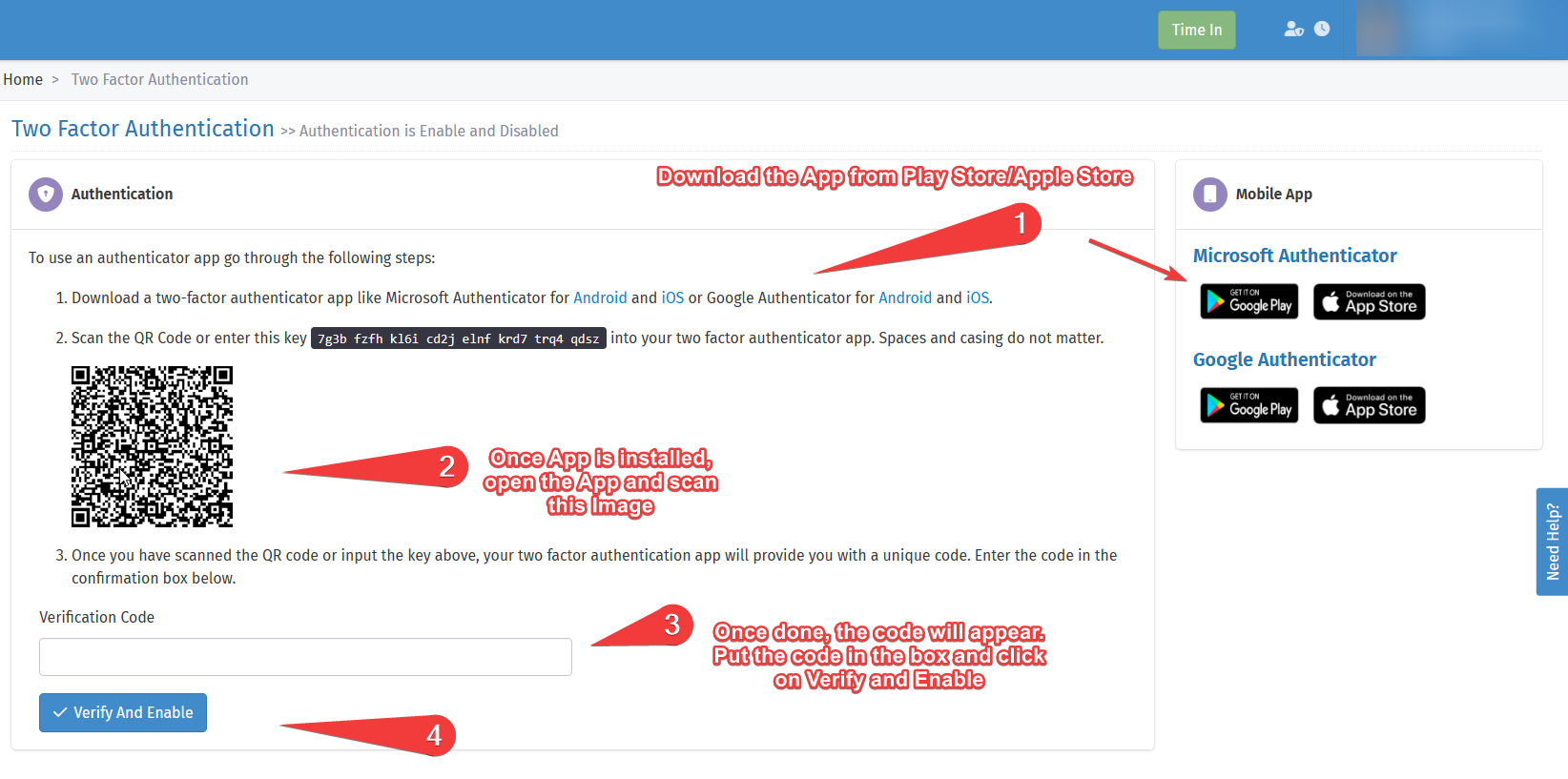
- Enable 2FA using the steps shown in the screenshot below.
If you have any queries, contact us at support@hrstop.com
Frequently asked questions
How do I delete employee data for the year 2022 while keeping the payslips of employees who have left?
Note: Once you delete employees from the system, all associated data is automatically and permanently deleted. This includes, but is not limited to, personal information, work history, performance records, payslips, and any other data stored in the system. Back up or export any necessary information before you proceed with the deletion, as this action cannot be undone.