How-to
Set the expiration period for compensatory off days
To ensure compensatory off days are utilized within a specific timeframe, you can set an expiration period in your system settings. This feature allows you to determine how many days the compensatory off days will remain valid before they expire.
Follow these steps to configure the expiration period for compensatory off:
Step-by-step guide
- Navigate to the Control Panel: Access the Control Panel in your system.
- Go to Settings: In the Control Panel, locate and click the Settings option.
- Select Leaves: Under the Settings menu, find and select Leaves to manage leave-related configurations.
- Edit the Comp Off Category: Once in the Leaves section, locate the Comp Off Category and select the option to edit it.
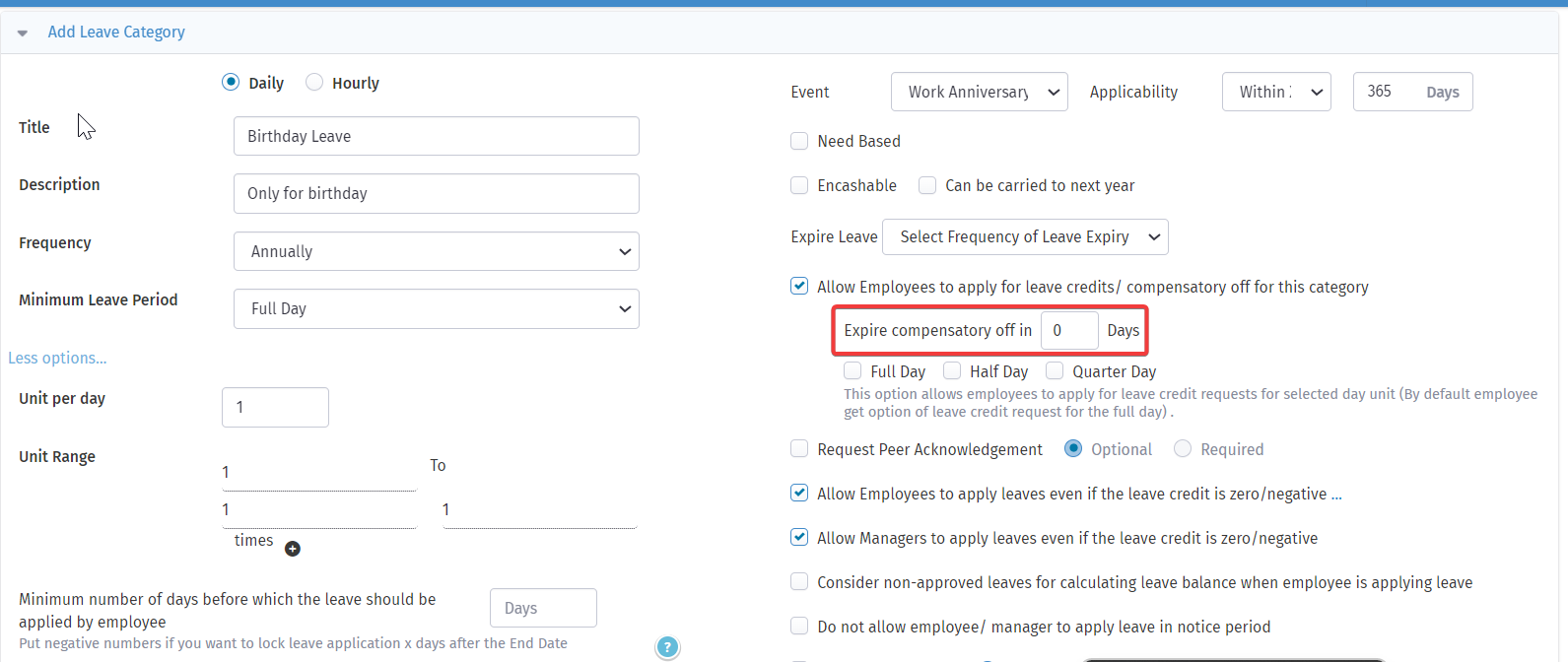
- Set the Expiration Period: In the edit settings for the Comp Off Category, look for the field labeled "Expire compensatory off in ___ days." Enter the number of days after which the compensatory off days expire.
This configuration helps maintain consistency in managing compensatory offs and ensure that employees utilize their time-off benefits within the desired timeframe.
Visual guidance:
The screenshot below guides you through the steps above.